
Hermes / Architecture & implementation
Building a personal AI agent
with Hermes
How my everyday agent is wired, and how one of its jobs, AI News, travels from a Markdown file onto this site.
01 / The system
What runs where
I wanted an assistant that would keep going after I closed the chat. Sometimes that means logging a health reading, sending the morning note, or pulling together a note on the economy and the job market. Sometimes it means working on this site. Either way, the useful part starts once Hermes understands what I asked. It has to put the result somewhere, reach the right machine, and show me that the work actually finished. I check each of those steps on its own.
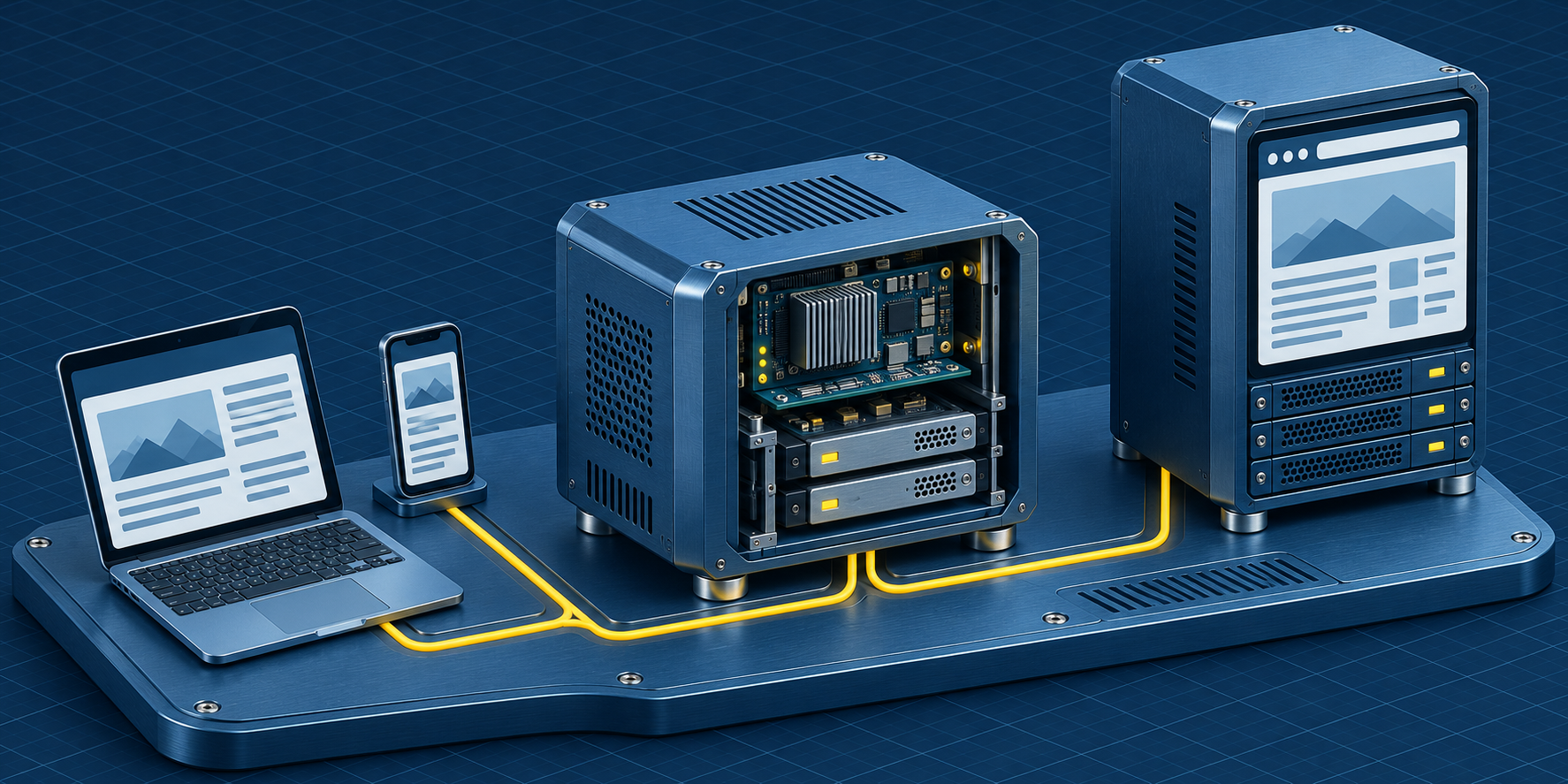
I run Hermes Agent, the open-source framework from Nous Research. Jobs I repeat, like a deploy or logging a reading, live in skills, so the next conversation already knows the steps. Three machines do the work. Hermes runs on EC2. My Mac handles the Apple-only pieces, Contacts and Messages, and keeps a CSV copy of my health data. Another host runs this site. Tailscale connects them on a private network.
From my phone I use Telegram. Voice notes are transcribed with faster-whisper in the gateway, and when Hermes talks back it uses OpenAI text-to-speech, in Opus. The desktop app reaches the same agent over the tailnet, including a live WebRTC session I can interrupt while it is still speaking.
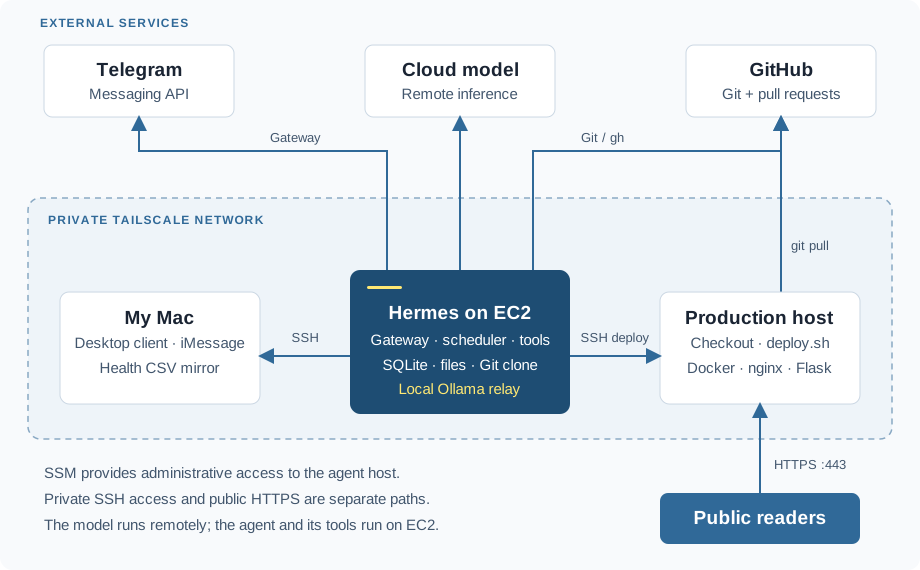
AI News is the best tour of the whole setup, because one update touches almost every piece. Hermes writes the briefing, commits the file, goes through GitHub, connects to production, and checks the site. The page says it updates daily at 7pm. That clock belongs to the agent. Flask just serves whatever document made it to production.
I'll follow one update from the Markdown file through Git, the production host, and Flask. Then I'll show how the agent host is set up, how those same connections carry the smaller daily jobs, and what I look at before I call any of them done.
02 / The publishing pipeline
How AI News gets onto the site
AI News is where all of this has to line up. Hermes writes a briefing, Git stores it, production picks it up, and Flask serves it. A good draft can still miss the site. A healthy site can still be showing yesterday. Those are different problems, and the setup is much easier to debug once I treat them that way.
What gets published is client/app/hermes/ai_news.md: a date, short summaries, and links. Publishing means replacing that file through the same repo I already use for the site. When you open AI News, Flask reads the file that was deployed. That request never starts an agent session or waits on a model.
1. Put the draft in Git
I keep the briefing in Git because the diff answers the questions I actually have. Which stories changed? Did a link disappear? Did the heading get fixed while the body stayed the same? The November 2 update, PR #4, touched only ai_news.md. PR #7 came later and corrected the heading, which said November 3. The date is part of the article. It can be wrong even when every deploy step worked.
Hermes does this from its own clone. It branches, commits, and pushes. The push and the pull request use different credentials. An SSH deploy key, scoped to this one repo, handles the push. The gh command, logged in as me, opens the PR and asks for a squash auto-merge. I keep those apart because they fail in different ways. A push that succeeds tells me nothing about whether gh can open or merge the PR.
# Illustrative sequence in the agent's clone; substitute the date and PR number.
git switch -c content/ai-news-YYYY-MM-DD
git add client/app/hermes/ai_news.md
git commit -m "Update AI News for YYYY-MM-DD"
git push -u origin content/ai-news-YYYY-MM-DD

gh pr create --base main --title "AI News: YYYY-MM-DD" \
  --body "Update the daily briefing and source links."
gh pr merge <pr-number> --auto --squash

# Inspect the result before deployment. The required state is MERGED.
gh pr view <pr-number> --json state,mergedAt,mergeCommit
I wait after asking for auto-merge. The command can return while a repo rule is still holding the merge. That happened on the first setup. GitHub would not accept the commit attribution, and switching the commits to my GitHub noreply address cleared it. Before I tell production to pull, I look at the PR and make sure the state is MERGED.
2. Put the merged file on the production host
From the agent, the deploy is ssh mysite 'sh ~/deploy.sh' over the tailnet. On the host, that script pulls the repo and runs docker-compose up -d --build. The script lives outside this website repo, so the checkout is not the whole story of how a deploy works. The repo does hold the configuration of the services being started.
The image starts from Python 3.11, installs the requirements, copies the client directory into /app, and starts uWSGI. Production Compose runs the app, Redis, and nginx. The volume on the app service is the detail I have to remember:
# Relevant excerpt from docker-compose.yml
services:
    app:
      build: .
      volumes:
          - ./client:/app
      expose:
        - 8080
That mount puts the host's client directory at /app inside the container, in front of the copy baked into the image. For a news-only change, the Markdown in the checkout is the file Flask reads. The script still rebuilds the image, because the same deploy also ships application changes. What you see on the site comes from the checkout.
Hermes reaches the host over the tailnet. Everyone else comes in through nginx on public HTTPS. Nginx passes application requests to app:8080 over the uWSGI protocol, and serves static files from their own location. uWSGI runs four workers, two threads each. Redis is there for the rest of the site. The briefing is the file on that mount.
3. Turn the file into a page
The path is tied to the Python module with Path(__file__).resolve().parent, so it does not matter which directory the process was started from. The loader reads the file as UTF-8 and refuses a blank one. Then the route hands the text to a renderer the site already had.
# Shared Markdown renderer
rendered = markdown.markdown(
    markdown_text,
    extensions=["extra", "sane_lists"],
)
sanitized = bleach.clean(
    rendered,
    tags=ALLOWED_MARKDOWN_TAGS,
    attributes=ALLOWED_MARKDOWN_ATTRIBUTES,
    protocols=ALLOWED_MARKDOWN_PROTOCOLS,
    strip=True,
)
return Markup(sanitized)
Turning Markdown into HTML, and deciding which HTML is allowed, are two different jobs. The converter gives me headings, lists, links, and tables. Bleach then drops anything that is not on the allowlist. Links are limited to HTTP, HTTPS, and mailto. Only the cleaned HTML is marked safe for Jinja. A test feeds the renderer a script tag, an image with an event handler, and a javascript: link, to make sure none of those survive.
If the file is missing, unreadable, badly encoded, or empty, the route logs the error and returns a short unavailable message with a 503. The tests cover a real document, a sample string, and the missing-file case. They stop at the Flask route. They don't run the agent, GitHub, the deploy script, or the production network.
4. Check that the site is up, then check the edition
On the agent, deploying and checking are two different commands. docker ps has to run on mysite, or I am looking at the wrong Docker. The HTTP check has to hit the public URL, the one readers actually use.
# From the agent host, after the PR has merged:
ssh mysite 'sh ~/deploy.sh'
ssh mysite 'docker ps'

# News-route diagnostic, beyond the original homepage check.
# Prints a status code. It does not say which edition is on the page.
curl --fail --silent --show-error --output /dev/null \
  --write-out '%{http_code}\n' https://thepythongeek.com/ai-news/
The first version of this check looked at running containers and the homepage. I also request /ai-news/, because the homepage never opens the briefing. A 200 only means the route could read some file. Yesterday's Markdown returns 200 too. That is why the curl above prints a status code and stops.
What I want next is a check tied to this particular release. Write down the edition date and the merge commit, look at the checkout on the host, and confirm the public page contains that edition. PR #7 is why this matters. The heading had the wrong day, and every machine in the path had done its job. The date needs to be an explicit value, with a timezone, rather than whatever clock happens to be on the machine running the check.
I also want a written way to roll back. Git still has the older briefings. A rollback would be a revert PR, another deploy, and the same look at the public page. I have not built the freshness check or that rollback yet.
03 / Provisioning & access
A small server, with a job I can explain
The machine that holds the clone, pushes the branch, and runs ssh mysite is a small Ubuntu 24.04 instance in us-east-1. It is a t3.medium, with 4 GB of memory and an encrypted gp3 root disk. That is plenty for the agent, the gateway, the browser tools, and an Ollama client. The model weights live with a cloud provider. What this machine does is keep the sessions, read files, run the schedule, and call tools.
Ollama listens on 127.0.0.1:11434. Hermes talks to its OpenAI-compatible API at /v1, and Ollama forwards each request to whichever cloud model I have selected. The socket is on the box. The prompt, and whatever context went with it, still leaves the instance.
I like that split. I can swap the model without moving the health database, rewriting the deploy, or rebuilding how messages get sent. Telegram and the desktop app are just two ways into the same agent. The Mac and the production server do the things this instance cannot do on its own.
What Terraform actually rebuilds
The infrastructure repository describes the instance, the security group, the instance profile, and the first-boot install. It picks an Ubuntu 24.04 image, requires IMDSv2, and encrypts the root disk. I can rebuild the machine from that config. I cannot get the SQLite records, the conversations, or the credentials back from Terraform. Those live on the instance.
cd infra
cp terraform.tfvars.example terraform.tfvars && cp backend.hcl.example backend.hcl
terraform init -backend-config=backend.hcl
terraform apply        # ~5-10 min of user-data install on first boot
Terraform finishing is not the same as the agent being ready. User-data is still installing packages after apply returns. The bootstrap installs Ollama, installs Hermes as the ubuntu user, and turns on lingering so that user's services keep running with nobody logged in. It also adds a systemd service for the dashboard, set to restart on failure. A progress log and a completion marker let me tell "the instance is up" from "the install actually finished."
The dashboard username, password, and signing secret are created on the box. OpenSSL generates the password, and the script turns off shell tracing while it writes those values. The env file ends up owned by ubuntu, mode 0600. None of those secrets need to live in the Terraform config, the state, or the user-data template.
Getting onto the box, and connecting the machines
I get a shell on Hermes through AWS Systems Manager Session Manager. The default Terraform setup has no inbound SSH rule and no EC2 key pair. When the agent needs Messages on my Mac, or the deploy script on production, it connects outward over Tailscale as an SSH client.
The dashboard listens on port 9119. While I am setting things up, dashboard_allowed_cidrs controls who can reach it. The repo's default is wide open, so tightening that list is a step I have to remember to do. Once the desktop can reach the gateway over the tailnet, I set the list to [] and apply again. That drops the public rule. The agent still needs to call out for model APIs, messaging, and package downloads.
On the Mac I install a dedicated ed25519 public key in authorized_keys. Production has its own SSH access, a pinned host key, and the mysite alias. Those keys are how the agent reaches those two machines. Git push uses a different key, a deploy key scoped to this repo. The gh command uses an OAuth token, and that token is what creates and merges the pull requests.
04 / Day to day
The ordinary jobs
The SSH path to my Mac is also how the everyday work runs. I log health readings, send my wife a note in the morning, and collect a short briefing on the economy and the job market. Shipping the site is the visible one. These smaller jobs are why I leave the agent running. They are easy to get half-right, and a half-finished one is worse than skipping it.
Logging a reading
Most mornings I just say the numbers. Weight, glucose, what I ate. Hermes pulls them out of the sentence and writes them to SQLite, so I don't have to open a form. Readings go in daily_readings: date, time, weight, glucose, blood pressure, pulse, and notes. Meals have their own table, with the food and the nutrition numbers. A glucose entry has to be one of fasting, before a meal, after a meal, bedtime, or random.
The tables keep a row in the right shape. They can't tell whether Hermes heard me correctly. That part is in the procedure: don't invent a number I didn't say, check serving sizes against the nutrition source, and ask me when the amount is something only I would know. Weight is stored in kilograms, so if I say it in pounds, the conversion has to be on purpose.
After the insert, a small Python script copies the whole database to ~/Documents/HealthData/ on my Mac. SQLite stays the source of truth. The CSVs are there so I can open them and use them somewhere else. I rewrite the whole export each time, because I go back and fix old rows. Change or delete a row, and the next export matches. Appending a single new line would leave the old version sitting in the file.
/usr/bin/python3 /home/ubuntu/health_data/health_sync.py
# synced: daily_readings=1, meals=6
Run the export again on the same database and you should get the same files, with no duplicates from the retry. Saving the reading and copying it to the Mac are two different jobs. If the copy fails, the row is still in SQLite. I keep these as records I can look up. I don't ask Hermes to tell me what they mean medically.
The morning note and the market briefing
At 6:00 AM it sends my wife a short note with a Bible verse. It rotates which verse it picks, signs the note “I love you, Barry,” and sends it through the Mac. Then it checks that the message really went out, and runs the health-data sync.
At 9:00 AM it puts together a short briefing on the economy and the job market. It checks that each item is still current, skips anything it has already sent me, and drops the rest in Telegram. I would rather get a few new findings than a long list padded with repeats.
Those times are what I want on a New Jersey clock. The schedules are anchored in UTC, so when daylight saving time changes they slide by an hour unless I move the anchors. A run at the wrong hour has still missed.
Knowing the message left my Mac
The Linux box reaches my Mac over SSH and sends through Messages with a short AppleScript. Before it sends, it looks the person up in Contacts, normalizes the phone number, and picks the one-to-one chat. A group thread that happens to include them is the wrong conversation. If I ask for a one-off message, Hermes confirms the recipient and the exact text with me first. The morning note uses the standing instruction I already gave it.
The check is a separate look at the Mac's Messages database, not a promise from the send script. It looks for the outgoing flag, a recent timestamp, and the exact text. Sometimes that text is tucked into attributedBody, so the check has to decode that field. What I learn is that my Mac recorded the message I meant to send. I still don't know if her phone got it, or if she read it.
05 / Checking the work
Before I call it done
A briefing has to land in Git, and then on another machine. A reading has to land in SQLite, and then on the Mac. I look at those one at a time.
| Job | What I can see | What I still don't know |
|---|---|---|
| Merge a briefing | The PR state is MERGED, and the change is on main. | Has production pulled that change? |
| Deploy the site | The deploy output, and the containers that are running. | Is the public news page showing this edition? |
| Log a reading | The numbers I meant are in SQLite. | Did the full CSV copy reach the Mac? |
| Send a message | The exact text, the outgoing flag, and a timestamp on the Mac. | Did the other phone receive it, or was it read? |
A couple of the fixes were ordinary systems work. The production checkout had the wrong owner, and the deploy user had to be in the Docker group so the script would not stop and ask for a sudo password. That group is a lot of power on the host. Dropping the password prompt lets the script run. The access is just as broad as it was.
Commit attribution was the same kind of snag. Git was happy with the commit. GitHub held the pull request until the commits used my GitHub noreply identity. Once that was fixed, the merge went through, and the history still showed who wrote it. I want snags like that to stay visible. They point at the exact step that needs a change.
What I want to build next
First is a real release check for AI News. Compare the edition and the merge commit with the checkout on the host and with the public page. A 200 is a weak way to decide the job is finished. Next to that, I want a short note on how to revert and redeploy. I also want those morning schedules to stay on local time through daylight saving, and a way to restore the agent's data without building a new EC2 instance.
After that, charts from the health history, once there is enough of it to show a trend. The base is already there. I have rows I can query, steps I can read, and machines the agent can reach. Anything I add should stay small enough to explain the same way.